 A company called Clipisode is today launching a new service that’s essentially a “talk show in a box,” as founder Brian Alvey describes it. Similar to how Anchor now allows anyone to build a professional podcast using simple mobile and web tools, Clipisode does this for video content. With Clipisode, you can record a video that can be shared across any platform – social media, the web, text messages – and collect video responses that can then be integrated into the “show” and overlaid with professional graphics.
The video responses feature is something more akin to a video voicemail-based call-in feature.
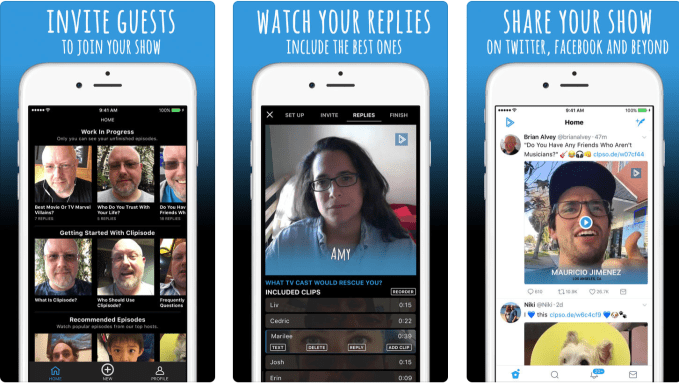
Here’s how it works. The content creator will first use Clipisode to record their video, and receive the link to share the video across social media, the web, or privately through email, text messaging, etc. When the viewer or guest clicks the link, they can respond to the question the show’s “host” posed.
For example, a reporter could ask for viewers’ thoughts on an issue or a creator could ask their fans what they want to see next.
How the video creator wants to use this functionality is really up to them, and specific to the type of video show they’re making.
To give you an idea, during a pre-launch period, the app has been tested by AXS TV to promote their upcoming Top Ten Revealed series by asking music industry experts “Who Is Your All-time Favorite Guitarist?”
BBC Scotland asked their Twitter followers who they want to see hired as the new manager for the Scotland national football team.

Who do you want as the next Scotland manager?
We asked and you told us.
Watch here
Watch my #Clipisode: "Sportscene Extra - Scotland Manager"
clpso.de/wb6a598


A full-time Twitch gamer, Chris Melberger asked his subscribers what device they watch Twitch on.
The content creator can then receive all the video responses to these questions privately, choose which ones they want to include in their finished show, and drag those responses into the order they want. The creator can respond back to the clips, too, or just add another clip at the end of their video. Uploading pre-recorded clips from services like Dropbox or even your phone is supported as well.

Our Top Ten Revealed experts @josemangin @EddieTrunk @KevinBlatt @lyndseyparker @PeteGiovine made a Webisode highlighting their favorite guitarists to get you excited for the show!
Set your DVR for the premiere SUNDAY --> vupulse.com/c/2991

Plus, content creators can use Clipisode to overlay professional-looking animations and graphics on top of the final video with the responses and replies. This makes it seem more like something made with help from a video editing team, not an app on your phone.
Because Clipisode invitations are web links, they don’t require the recipients to download an app.
“[People] don’t want to download an app for a one-time video reply,” explains Alvey. “But with this, people can reply.” And, he adds, what makes Clipisode interesting from a technical perspective, is that the web links users click to reply can work in any app in a way that feels seamless to the end user.
“That’s our biggest trick – making this work in other people’s apps, so there’s no new social network to join and nothing to download,” he says.
The app is free currently, but the plan is to generate revenue by later selling subscription access to the authoring suite where users can create the animated overlays and branding components that give the video the professional look-and-feel.
In an online CMS, creators can author, test and deploy animated themes that run on top of their videos.
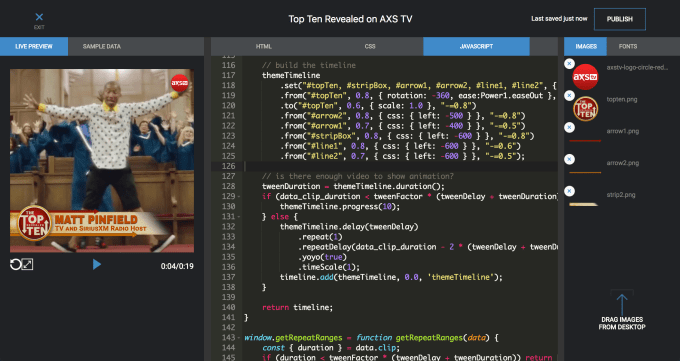
The final video product can be shared back to social media, or downloaded as a video file to be published on video-sharing sites, social media, or as a video podcast.
Clipisode has been in development for some time, Alvey says. The company originally raised less than a million from investors including Mike Jones and Mark Cuban for a different product the founder describes as a Patreon competitor, before pivoting to Clipisode. Investors funded the new product with less than half a million.
The app itself took a couple of years to complete, something that Alvey says has to do with the animation studio it includes and the small team. (It’s just him and technical co-founder Max Schmeling.)
Comments
Post a Comment