 Amazon is making it easier for parents to manage their child’s device usage from their own phone, tablet, or PC with an update to the Parent Dashboard in Amazon FreeTime. Since its launch in 2012, Amazon’s FreeTime Unlimited has been one of the better implementations of combining kid-friendly content with customizable profiles and parental controls. Today, parents can monitor and manage kids’ screen time, time limits, daily educational goals, device activity, and more while allowing children to access family-friendly content like books, videos, apps and games.
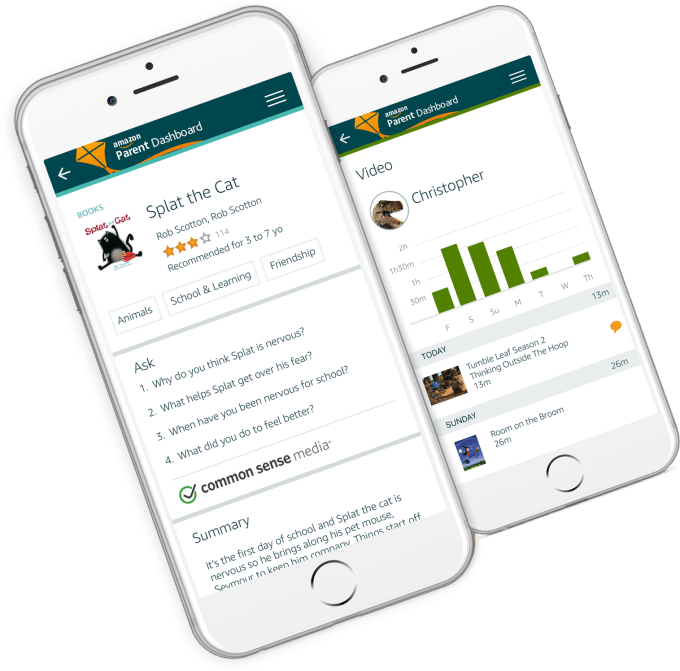
Last year, Amazon introduced a Parent Dashboard as another means of helping parents monitor screen time as well as have conversations with kids about what they’re doing on their devices. For example, if the child was reading a particular book, the dashboard might prompt parents with questions they could ask about the books’ content. The dashboard also provided a summary of the child’s daily device use, including things like what books were read, videos watched, apps or games played, and websites visited, and for how long.
According to a research study Amazon commissioned with Kelton Global Research, the company found that 97 percent of parents monitor or manage their kids’ use of tablets and smartphones, but 75 percent don’t want to hover over kids when they’re using their devices.
On Thursday, Amazon addressed this problem by allowing parents to remotely configure the parental control settings from the online Parent Dashboard in order to manage the child’s device from afar from a phone, tablet or computer.
The controls are the same as those available through the child’s device itself. Parents can set a device bedtime, daily goals and time limits, adjust their smart filter, and enable the web browser remotely. They can also remotely add new books, videos, apps and games to their child’s FreeTime profile, and lock or unlock the device for a set period of time.
The addition comes following last year’s launch of FreeTime on Android, and Google’s own entry into the parental control software space with the public launch of Family Link last fall. Apple also this year made vague promises about improving its existing parental controls in the future, in response to pressure from two Apple shareholder groups, Jana Partners LLC and the California State Teachers’ Retirement System.
With the increased activity in the parental control market, Amazon’s FreeTime may lose some of its competitive advantages. Amazon also needed to catch up to the remote control capabilities provided with Google’s Family Link.
There are those who argue that parental controls that do things like limit kids’ activity on apps and games or turn off access to the internet are enablers of lazy parenting, where devices instead of people are setting the rules. But few parents use parental controls in that fashion. Rather, they establish house rules then use software to remind children the rules exist and to enforce them.
The updated FreeTime Parent Dashboard is available via a mobile-optimized website at parents.amazon.com.
Comments
Post a Comment